
Melo App
MeloKnows Bilgi Teknolojileri ve Reklam Hiz. A.ŞBeauty
0.00.00 Reviews
- Version
- 16.45
- Installs
- 10.00K
- Age Rating
- Everyone
Screenshots
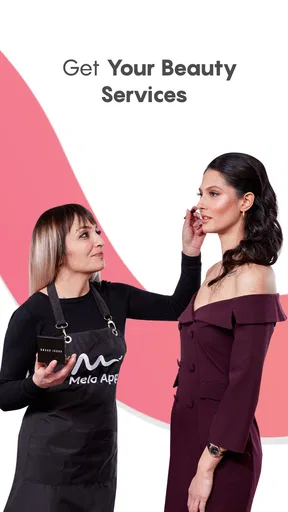
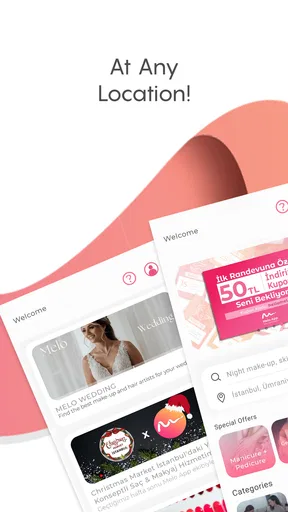
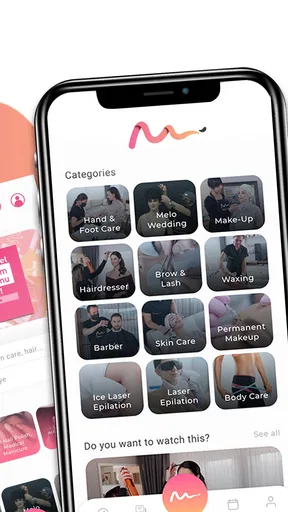
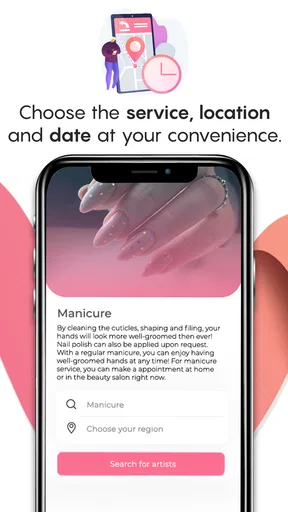
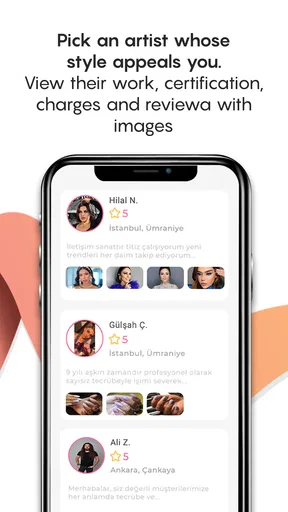
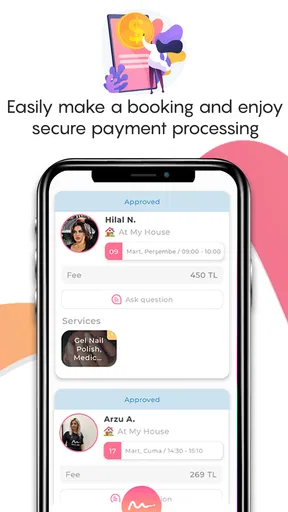

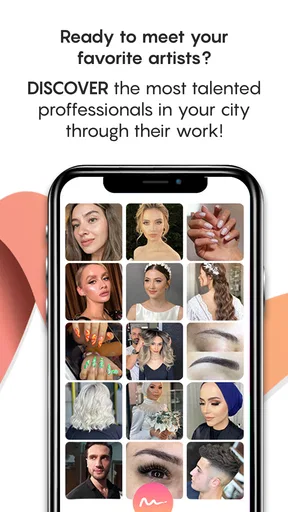
Our Review of Melo App
 Analysis by Appyee
Booking a beauty service is usually easy when I have plenty of time, but it becomes much less convenient when I am trying to manage work, home responsibilities, and an appointment in the same day. Melo App approaches that problem from a practical angle: it is a beauty app designed around receiving personal beauty services at home. After spending time with it, I see its main appeal in the way it can fit a service into an existing routine rather than making the user build the routine around a salon visit.
I would describe it as a useful option for people who value convenience more than browsing a large collection of beauty content. It is free to use, aimed at everyone, and developed by MeloKnows Bilgi Teknolojileri ve Reklam Hiz. A.Ş. The application has passed the early experimental stage, with more than ten thousand installs, while its current version is 16.45. Those details matter less than the central question: can it make arranging a beauty appointment at home feel simpler and more manageable?
How Melo App fits into a shared household
The clearest use case I found is a busy household where one person wants a beauty service but does not want to spend additional time traveling. Imagine finishing a workday while also looking after a child, preparing dinner, or coordinating with someone else at home. A salon appointment adds travel, waiting, and another fixed location to the plan. A home-service app can reduce that friction by bringing the appointment into the place where the rest of the day is already happening.
That does not mean the app turns a home into a salon or solves every scheduling problem. The household still needs a suitable time and a comfortable space. Someone may need privacy, another person may need to keep children occupied, and shared rooms may not be available for the whole appointment. My practical advice is to treat the booking as an event that affects the home, not just as a personal calendar entry.
This is especially relevant when two people share a device. If one person opens the app to arrange a service, I would avoid assuming that the next person can immediately understand whose appointment is being handled. Before confirming anything, check the selected details carefully and make sure the person receiving the service knows the planned timing. A shared phone can make access convenient, but it can also blur responsibility if several household members use the same screen.
For couples, roommates, or adult family members, the app can support informal coordination, but I would keep the agreement outside the app as well. A quick message or shared calendar note can prevent the common mistake of booking a service when the room is occupied or when nobody is available to receive the professional. This is one of the less obvious parts of using a home-service platform: convenience depends on the household being ready for the visit.
What the home setting changes
At a salon, the environment is already prepared for beauty work. At home, the user has more control, but also more responsibility. I would choose a clean, well-lit area with enough room to sit comfortably and keep personal items out of the way. If the service requires products or tools, having a clear surface nearby can make the visit feel more organized, even though the app itself is not a replacement for preparation.
There is also a privacy advantage. Some people feel more relaxed receiving a personal service in familiar surroundings, particularly if they dislike busy salons or have difficulty leaving home. On the other hand, users who enjoy the atmosphere, equipment, and social setting of a salon may find the home format less appealing. Melo App is strongest when convenience and privacy are more important than the traditional salon experience.
Setting up the experience without confusing household boundaries
My first recommendation is to decide who the appointment belongs to before opening the booking flow. On a personal phone, that may be obvious. On a shared tablet or family device, it is not. The person making the booking should know whose name, contact details, and home information are being used, and the recipient should be aware of the arrangement. This is not a special feature claim about Melo App; it is simply good practice when a service is delivered to a shared address.
I also would not let a child make a booking independently. The app carries an Everyone content rating, which makes it broadly suitable from a content perspective, but that should not be confused with independent purchasing or appointment authority. A beauty appointment involves a real person arriving at a real home, so an adult should handle the decision, timing, and communication. Younger household members can help choose a convenient time or discuss the service, but the final responsibility should remain with a trusted adult.
Account boundaries deserve the same care. If several adults use one device, avoid leaving the app open on a screen that exposes another person’s appointment details. Locking the device when it is not in use and closing the app after a booking are small habits, yet they make shared-device use less awkward. I found this more useful than trying to create a complicated family system that the app is not presented as providing.
Another practical step is to review the appointment information immediately after arranging it. Check the recipient, address, date, and time, then tell anyone at home who may be affected. If the booking is for another household member, do not assume that person will see every detail just because the appointment was created on their behalf. A short confirmation message can prevent misunderstandings, especially in homes where multiple people have different routines.
Why convenience still needs a pause before confirmation
The promise of home service can encourage quick decisions. I would resist tapping through too quickly, particularly when using a shared device or booking for someone else. Take a moment to consider whether the recipient will be home, whether the space is suitable, and whether the appointment fits around work, school, or care responsibilities.
This pause is also useful for expectations. A home appointment may feel more personal than a salon visit, but it is still a scheduled professional service. The user should be ready at the agreed time rather than treating the arrival as completely flexible. If a household tends to change plans at the last minute, a conventional walk-in salon may sometimes be easier, because it does not bring the same coordination issue into the home.
Coordinating appointments around real routines
Where Melo App makes the most sense to me is in planning around fixed parts of the day. A parent might prefer a time when another adult is home. A remote worker may choose a break between meetings. A roommate may arrange a service while the other person is away, provided the home environment and access arrangements are clear. These are small decisions, but they determine whether the app feels genuinely convenient or merely different from visiting a salon.
I would use a simple three-step routine. First, choose the person receiving the service. Second, check the household calendar and confirm that the space will be available. Third, share the appointment details with the people who need to know. This workflow is more reliable than relying on memory, especially when the app is used by several adults on one device.
For a shared home, timing is not only about the appointment itself. Consider preparation beforehand and recovery afterward. Someone may need quiet, privacy, or access to a particular room. If the service involves products, the household may also want to keep pets, children, or clutter away from the working area. I appreciate the home-based concept, but I would not describe it as effortless; it moves some of the organization from the salon to the customer.
The app can also be useful for people who dislike making phone calls. A digital booking process feels less intrusive than explaining a request aloud, and it gives the user a chance to think through the arrangement before committing. That said, users who prefer speaking directly with a salon may miss the reassurance of a conversation. If a service requires detailed discussion or the user has unusual needs, a traditional provider with direct phone support may be a better fit.
Using one device for several people
Shared-device use works best when each adult treats the app as a tool for a specific appointment rather than as a household noticeboard. I would not leave a session open for someone else to continue without checking what has already been entered. If a booking is interrupted, start by reviewing the current selections instead of assuming the previous user was arranging the same service for the same person.
It is also sensible to keep personal preferences separate in conversation, even if the app makes access convenient. One person may want a service for an event, while another may simply want routine maintenance. Combining those decisions casually can lead to the wrong time or an appointment that does not match the recipient’s expectations. The app helps with access to home beauty services, but household communication still carries the personal context.
For roommates, I would be especially clear about entry arrangements. A home appointment should not depend on a vague assumption that somebody will open the door. Decide who will be present and communicate that plan. For families, make sure the adult responsible for the home knows about the visit. These habits are not flashy, but they are the difference between a smooth booking and an uncomfortable surprise.
Age, trust, and deciding who should use it
The Everyone rating makes Melo App approachable for a broad audience, but the real-world context deserves more thought. A beauty service at home involves an interaction with a professional, so trust should be considered at the household level. I would recommend that a responsible adult arrange appointments for minors and remain involved in the timing and setting. The app should not be treated as permission for a young user to invite an unknown visitor into the home without supervision.
For older adults, the home-service idea may be particularly attractive if traveling to a salon is tiring or inconvenient. A family member can help with the digital steps while the recipient keeps control over the actual choice. The best arrangement is collaborative: one person can handle the device, but the person receiving the service should understand what has been requested and when it will happen.
Trust also applies to expectations between household members. Do not book a service for another adult as a surprise unless you already know that the person would welcome it. Beauty routines are personal, and a convenient appointment can still feel intrusive if it is arranged without consent. I see the app as a way to support someone’s choice, not as a way to make that choice for them.
Privacy-minded users should use the app thoughtfully on shared hardware. Review what is visible before handing the device to another person, and avoid discussing private appointment information in a group setting if the recipient would rather keep it personal. These are ordinary digital hygiene steps, but they matter more when the service enters the home instead of taking place in a public salon.
Who will appreciate it most
I would recommend Melo App to people who already know that home service suits their lifestyle. It is a good candidate for busy adults, people who prefer private surroundings, and households that can coordinate a clear appointment window. It may also appeal to anyone who finds travel to a salon more troublesome than the beauty service itself.
I would be more cautious about recommending it to someone who wants spontaneous, walk-in treatment, a salon’s full atmosphere, or extensive face-to-face consultation before deciding. It is also not the ideal choice for households that cannot reliably provide a suitable space or adult supervision. In those cases, the usual salon alternative may offer clearer boundaries and less home coordination.
Compared with searching for an individual local professional through general web results or social media, a dedicated beauty app feels more focused. The trade-off is that the user is working within the experience offered by one platform rather than freely comparing every nearby option. Compared with calling a salon, the digital route can be more convenient for people who dislike phone conversations, but it may feel less reassuring to users who want immediate human guidance.
My household verdict after using Melo App
Melo App has a clear purpose, and I think it succeeds when the user values having a beauty service come to the home. Its free access lowers the barrier to trying the experience, while the Everyone rating makes it easy to understand as a broadly accessible app rather than a niche tool. It was released on January 22, 2020, and its ongoing version 16.45 suggests an established product rather than a one-off experiment. It supports Android devices running version 7.0 or later, which also makes it relevant to people using older compatible phones.
My strongest positive impression is not that it eliminates all effort, but that it changes where the effort happens. Instead of traveling and waiting at a salon, the user spends more time coordinating the home, the household, and the appointment. For a person with a predictable routine, that is a worthwhile exchange. For someone whose home is busy or unpredictable, the same exchange may be frustrating.
The most important limitation is therefore situational. The app cannot make a shared room private, guarantee that every household member remembers the booking, or replace the trust and communication needed when a professional visits the home. I would use it with a clear plan: choose the recipient, check the household schedule, prepare the space, and tell the relevant adults. That approach makes the convenience feel real rather than assumed.
In the end, I see Melo App as a practical beauty option for organized households and individuals who prefer comfort and time savings over the traditional salon routine. I would recommend trying it if home service matches your lifestyle, especially when travel is the main obstacle. I would skip it in favor of a salon or direct provider when you need walk-in flexibility, extensive personal consultation, or a setting separate from home. The best reason to use it is simple: it brings the appointment into your routine, but only works well when the household is ready to make room for it.
Verdict
Strengths of Melo App
- Simple interface makes discovering music quick and intuitive.
- Personalized recommendations help uncover new artists and songs.
- Useful playlists suit different moods, activities, and listening habits.
- Smooth playback provides a pleasant experience on supported devices.
- Social features make sharing favorite tracks with friends easy.
Limitations of Melo App
- Some features may require a premium subscription.
- Recommendation quality can vary for less common music tastes.
- The catalog may differ by country or licensing agreements.
- Occasional buffering may occur on slower connections.
- Background listening can increase battery and mobile data usage.
Similar Picks in This Category
View All
Beauty Makeup Editor & Camera
Photo & Video Editors - Instant Solution4.7

Perfect365: Face Makeup Editor
Perfect365, Inc.3.5

Mirror Plus - HD Mirror app
Digitalchemy, LLC4.8

Cute Lock Screen & Wallpapers
Prometheus Interactive LLC4.6

HD Camera for Android
One Music Player4.5

Phone Mirror app - True Mirror
Cards4.6
Frequently Asked Questions
What is Melo App and what can I use it for?
Melo App is an entertainment and social platform designed for discovering, listening to, or interacting with digital content, depending on the version available in your region. After installing it, users can explore its main sections, personalize their experience, and access content through a simple mobile interface. Before downloading, check the official store description because available features may vary by country and device.
Is Melo App free to download and use?
Melo App can generally be downloaded at no cost, but some features or content may require in-app purchases, a subscription, or account access. The free version may include advertising or limitations on certain tools. I recommend reviewing the pricing details shown in Google Play or the App Store before confirming a purchase, especially if the application offers recurring subscription plans.
Does Melo App require an account or personal information?
Some functions in Melo App may be available immediately after installation, while personalized features can require registration. Depending on how you use the app, it may request information such as an email address, username, age, or profile preferences. Before creating an account, review the privacy policy and permissions carefully, and avoid providing more personal information than is necessary.
Can Melo App be used offline or without a strong internet connection?
Melo App is primarily designed to work with an internet connection, particularly when loading online content, synchronizing your profile, or using interactive features. Certain sections may remain accessible offline if the app supports downloads or cached content, but this should not be assumed for every function. Performance can also depend on network speed, device storage, and regional availability.
Is Melo App safe for children and compatible with my device?
Before installing Melo App, check its age rating, content description, and permission requests in the official Android or iOS store. The app may include community content, advertising, messaging, or purchases that are not suitable for younger users without supervision. Also verify the required operating-system version, available storage, and developer information to ensure compatibility and download the legitimate application.
